OnYourMark - Integrated Tutor Dashboard Platform
Enabling data-driven tutoring for 3000+ tutors and 8000+ students by centralizing insights and actions in one platform.
Internal SaaS Platform
0→1 Data Dashboard
EdTech
Develop For Good
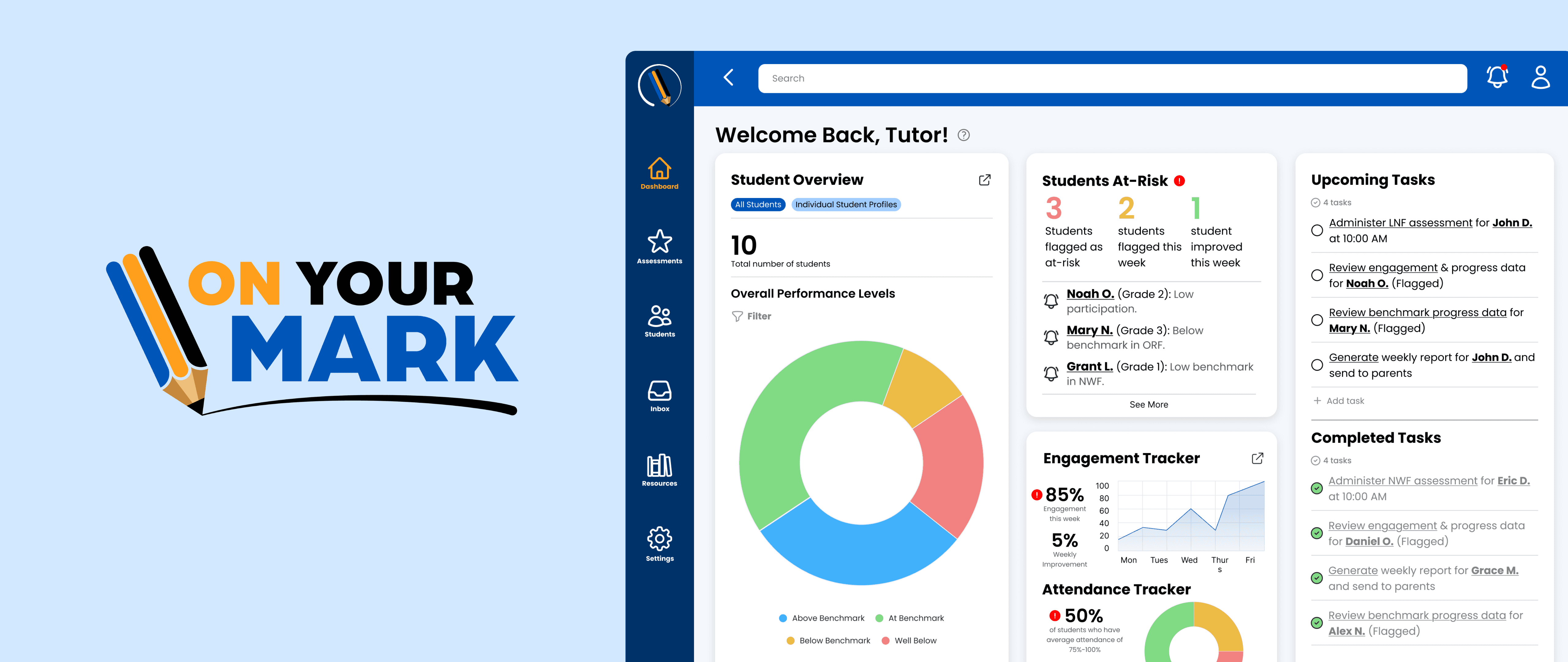
OnYourMark is a nonprofit transforming K–5 literacy through high-impact virtual tutoring. However, tutors on the front lines were bogged down by disjointed systems, shuffling between Google Sheets and various state-specific tools, which led to hours of manual data entry and limited visibility into which students were falling behind.
To scale its operations and overcome this challenge, the team set out to create a centralized platform that would streamline tutor workflows, surface key insights, and support personalized instruction.
OnYourMark is a nonprofit transforming K–5 literacy through high-impact virtual tutoring. However, tutors on the front lines were bogged down by disjointed systems, shuffling between Google Sheets and various state-specific tools, which led to hours of manual data entry and limited visibility into which students were falling behind.
To scale its operations and overcome this challenge, the team set out to create a centralized platform that would streamline tutor workflows, surface key insights, and support personalized instruction.
MY ROLE
MY ROLE
Product Designer
Product Designer
TIMELINE
TIMELINE
October 2024 - March 2025
16 Weeks
October 2024 - March 2025
16 Weeks
TEAM
TEAM
1 Product Manager
1 Design Manager
6 Product Designers
1 Product Manager
1 Design Manager
6 Product Designers
SKILLS
SKILLS
Figma, FigJam, Notion, UserTesting.com; PRD Writing, Interaction Design, UX Strategy, Wireframing, Prototyping
Figma, FigJam, Notion, UserTesting.com; PRD Writing, Interaction Design, UX Strategy, Wireframing, Prototyping
The Approach: From Inefficiency to Empowerment
The Approach: From Inefficiency to Empowerment
Our initial research, which included surveys and in-depth interviews with tutors, uncovered a central, recurring theme: tutors felt more like data administrators than educators.
They were spending a significant portion of their time navigating fragmented systems and performing manual data entry, which directly took away from their ability to plan and deliver the personalized interventions students needed. The core issues we identified were:
Our initial research, which included surveys and in-depth interviews with tutors, uncovered a central, recurring theme: tutors felt more like data administrators than educators.
They were spending a significant portion of their time navigating fragmented systems and performing manual data entry, which directly took away from their ability to plan and deliver the personalized interventions students needed. The core issues we identified were:
A Fractured Workflow
A Fractured Workflow
Tutors constantly switched between Google Sheets and state-specific platforms, leading to wasted time and a high cognitive load.
Tutors constantly switched between Google Sheets and state-specific platforms, leading to wasted time and a high cognitive load.
A Lack of Clarity
A Lack of Clarity
Without a single source of truth, tutors had limited visibility into which students were struggling most, making it difficult to prioritize their efforts.
Without a single source of truth, tutors had limited visibility into which students were struggling most, making it difficult to prioritize their efforts.
With these core problems in mind, our team moved from research into synthesis, reframing the challenges as clear opportunities for design:
With these core problems in mind, our team moved from research into synthesis, reframing the challenges as clear opportunities for design:
How might we... consolidate essential tools into a single, intuitive interface to reduce tutors' administrative burden?
How might we... consolidate essential tools into a single, intuitive interface to reduce tutors' administrative burden?
How might we... consolidate essential tools into a single, intuitive interface to reduce tutors' administrative burden?
How might we... proactively surface the most critical student data to help tutors easily identify and support at-risk learners?
How might we... proactively surface the most critical student data to help tutors easily identify and support at-risk learners?
How might we... proactively surface the most critical student data to help tutors easily identify and support at-risk learners?
Translating Tutor Needs into a Product Roadmap
Translating Tutor Needs into a Product Roadmap
To ensure we were building a solution that actually solved the "Data Fatigue" problem, I led a feature prioritization exercise. Our surveys revealed that tutors didn't want more data, they wanted clarity and direction. I categorized their requests into three buckets based on impact and feasibility:
To ensure we were building a solution that actually solved the "Data Fatigue" problem, I led a feature prioritization exercise. Our surveys revealed that tutors didn't want more data, they wanted clarity and direction. I categorized their requests into three buckets based on impact and feasibility:
Visibility
Visibility
"How are my students doing right now?" (Overviews & Graphs)
"How are my students doing right now?" (Overviews & Graphs)
Accountability
Accountability
"What do I need to finish today?" (To-Do List)
"What do I need to finish today?" (To-Do List)
Action
Action
"How do I help the student who is falling behind?" (Recommendations)
"How do I help the student who is falling behind?" (Recommendations)
Mapping User Needs to UI Modules
Mapping User Needs to UI Modules
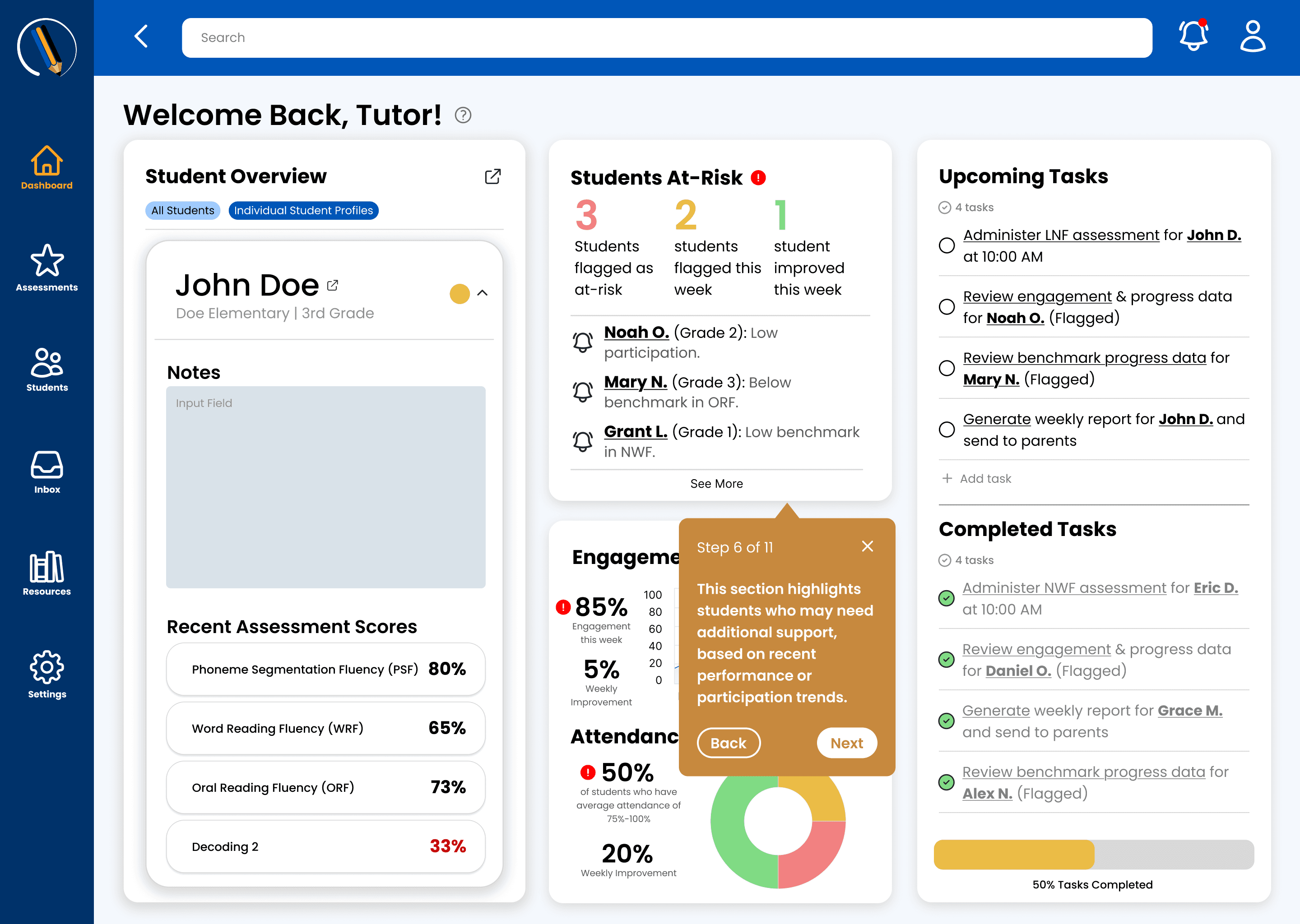
I translated these high-level needs into specific dashboard components. I focused on a modular layout that allowed tutors to scan their most important metrics in under 10 seconds before a session started.
I translated these high-level needs into specific dashboard components. I focused on a modular layout that allowed tutors to scan their most important metrics in under 10 seconds before a session started.
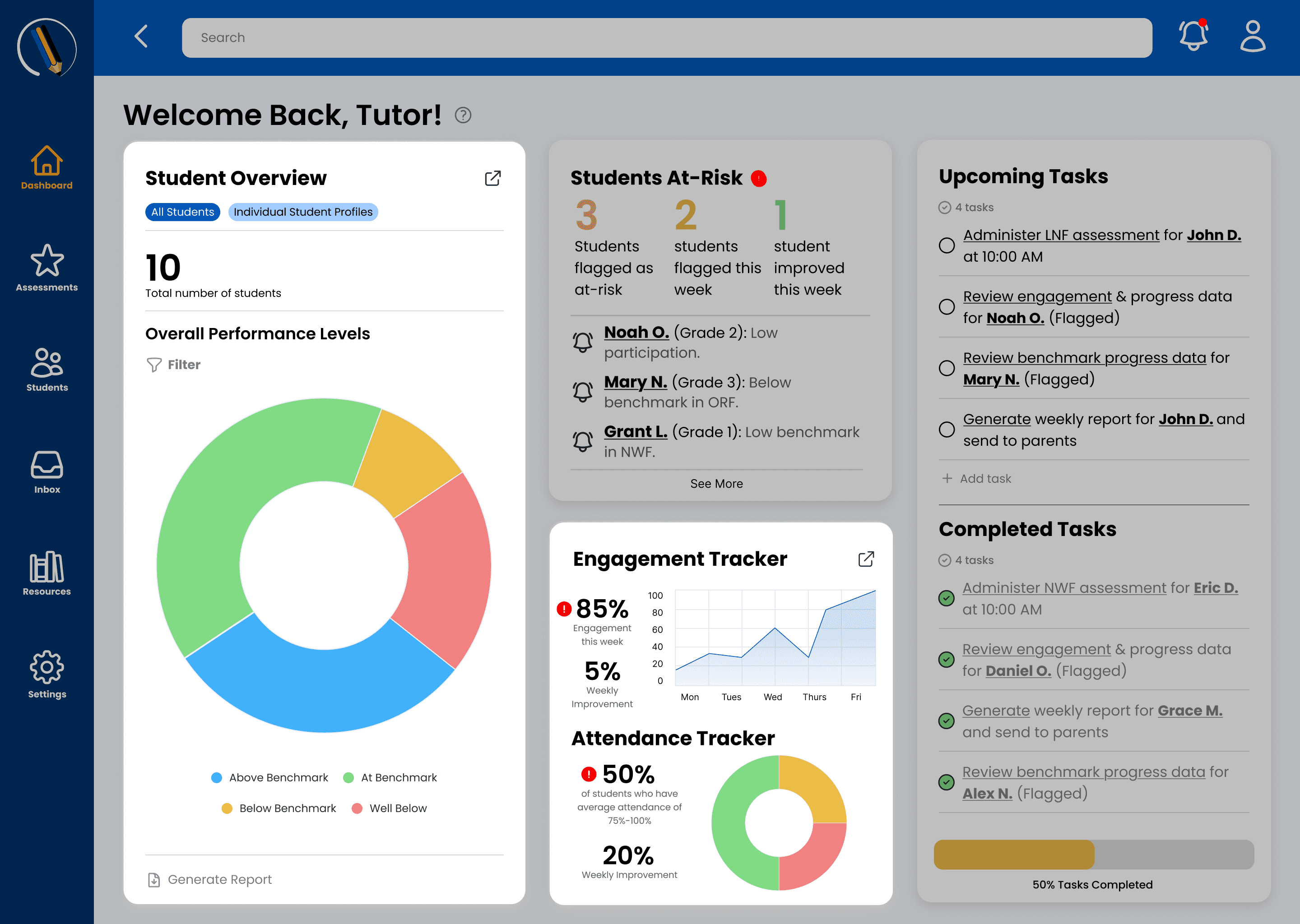
Student Overview Data
Student Overview Data
I designed visual graphs that showed performance trends and levels. This allowed tutors to see at a glance the overall status of their students and drill down deeper for more information if needed.
I designed visual graphs that showed performance trends and levels. This allowed tutors to see at a glance the overall status of their students and drill down deeper for more information if needed.
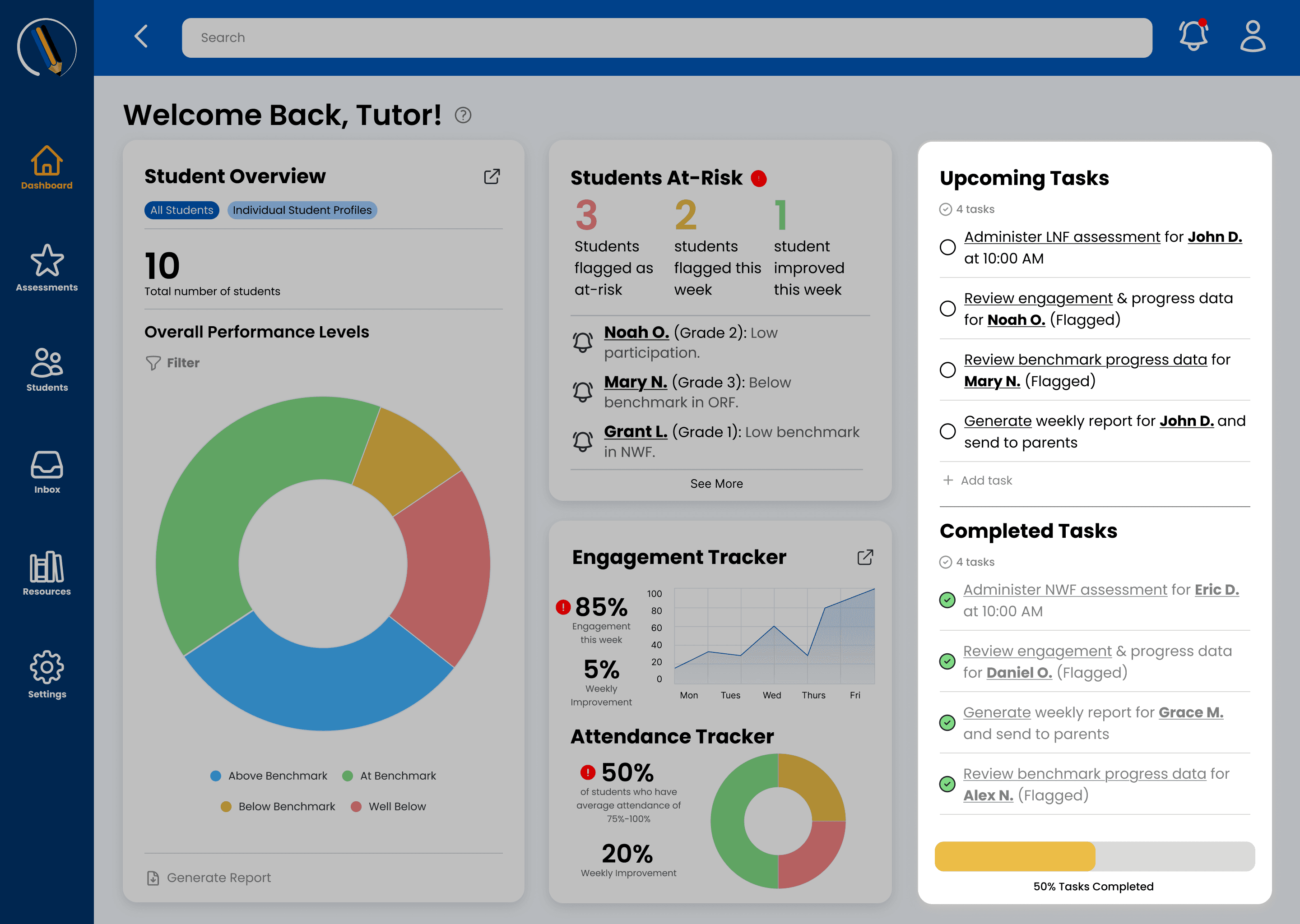
To-Do List
To-Do List
Tutors mentioned feeling overwhelmed by administrative tasks. I integrated a "Task Management" module directly into the home view so they could check off session notes and prep work without leaving the dashboard.
Tutors mentioned feeling overwhelmed by administrative tasks. I integrated a "Task Management" module directly into the home view so they could check off session notes and prep work without leaving the dashboard.
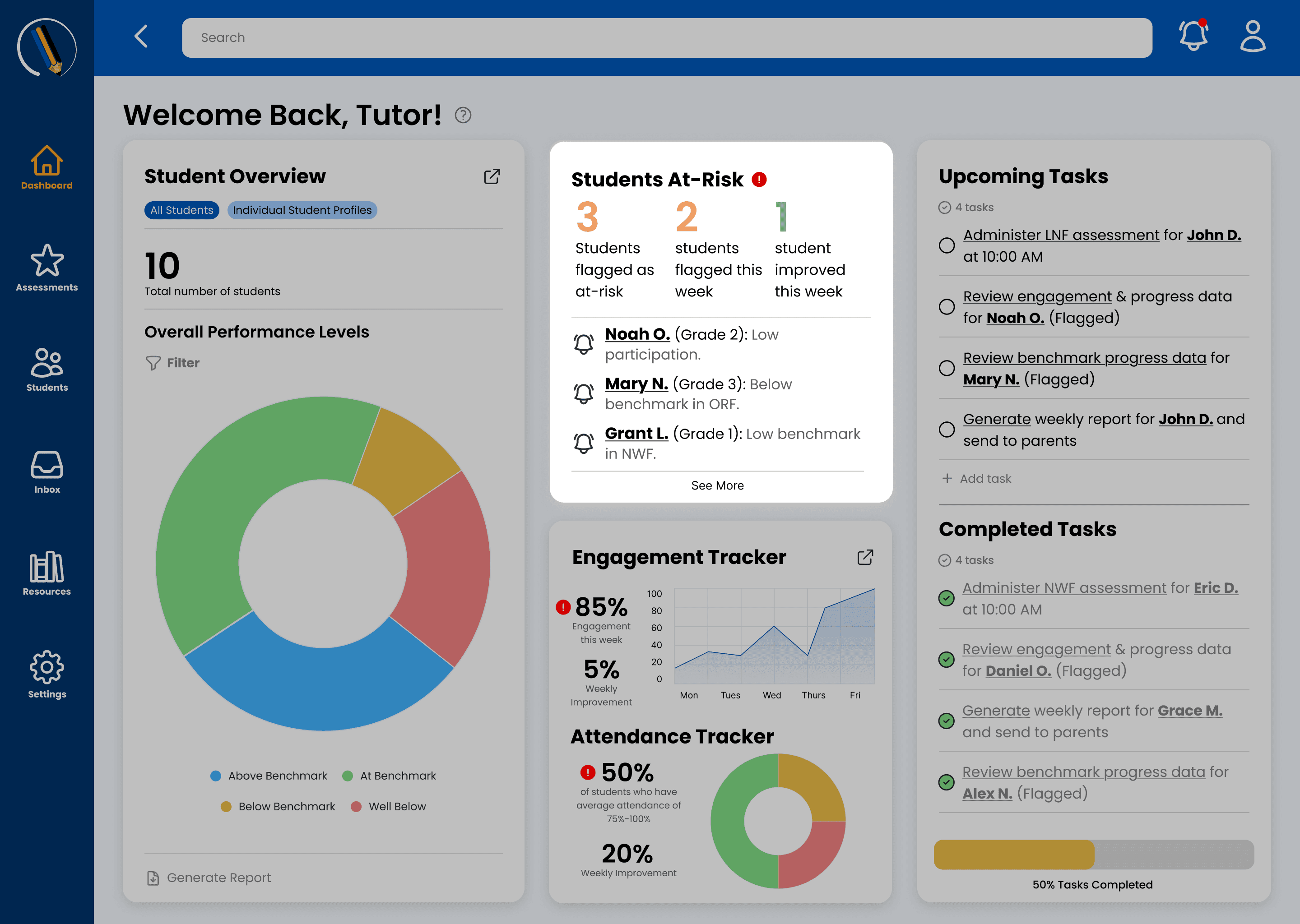
Actions to Take
Actions to Take
This became the "At-Risk" module. Instead of just flagging a student, it surfaced a direct "Action" button, linking the tutor immediately to the specific lesson plan or assessment needed.
This became the "At-Risk" module. Instead of just flagging a student, it surfaced a direct "Action" button, linking the tutor immediately to the specific lesson plan or assessment needed.
Once the High-Fidelity prototype was built, it was time to validate these choices. We didn't just want to know if it looked good; we needed to know if it was efficient.
Once the High-Fidelity prototype was built, it was time to validate these choices. We didn't just want to know if it looked good; we needed to know if it was efficient.
Refining after Usability Testing
Refining after Usability Testing
I observed tutors as they attempted to complete certain tasks through UserTesting.com. While they loved the new graphs, a significant friction point emerged: Nested Information.
I observed tutors as they attempted to complete certain tasks through UserTesting.com. While they loved the new graphs, a significant friction point emerged: Nested Information.
"I see that the student is at risk, but where do I find the specific lesson I should use today?"
"I see that the student is at risk, but where do I find the specific lesson I should use today?"
— User Testing Participant
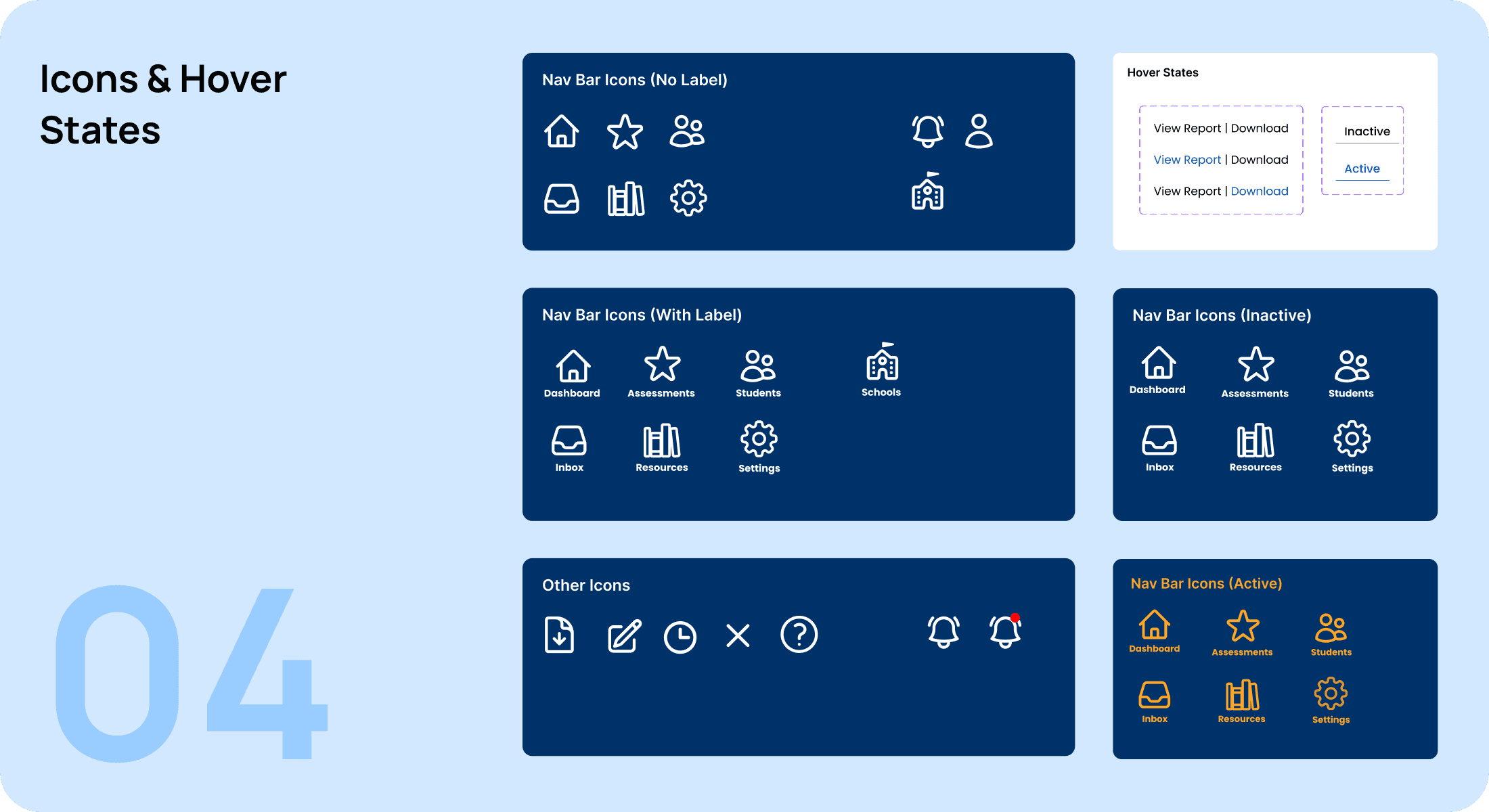
Based on this feedback, I added Guided Tooltips into an onboarding flow that could be revisted. This helped users learn the whole product before being thrown into the complexities of working through it.
Based on this feedback, I added Guided Tooltips into an onboarding flow that could be revisted. This helped users learn the whole product before being thrown into the complexities of working through it.
Standardizing for Scale: The Design System
Standardizing for Scale: The Design System
Standardizing for Scale: The Design System
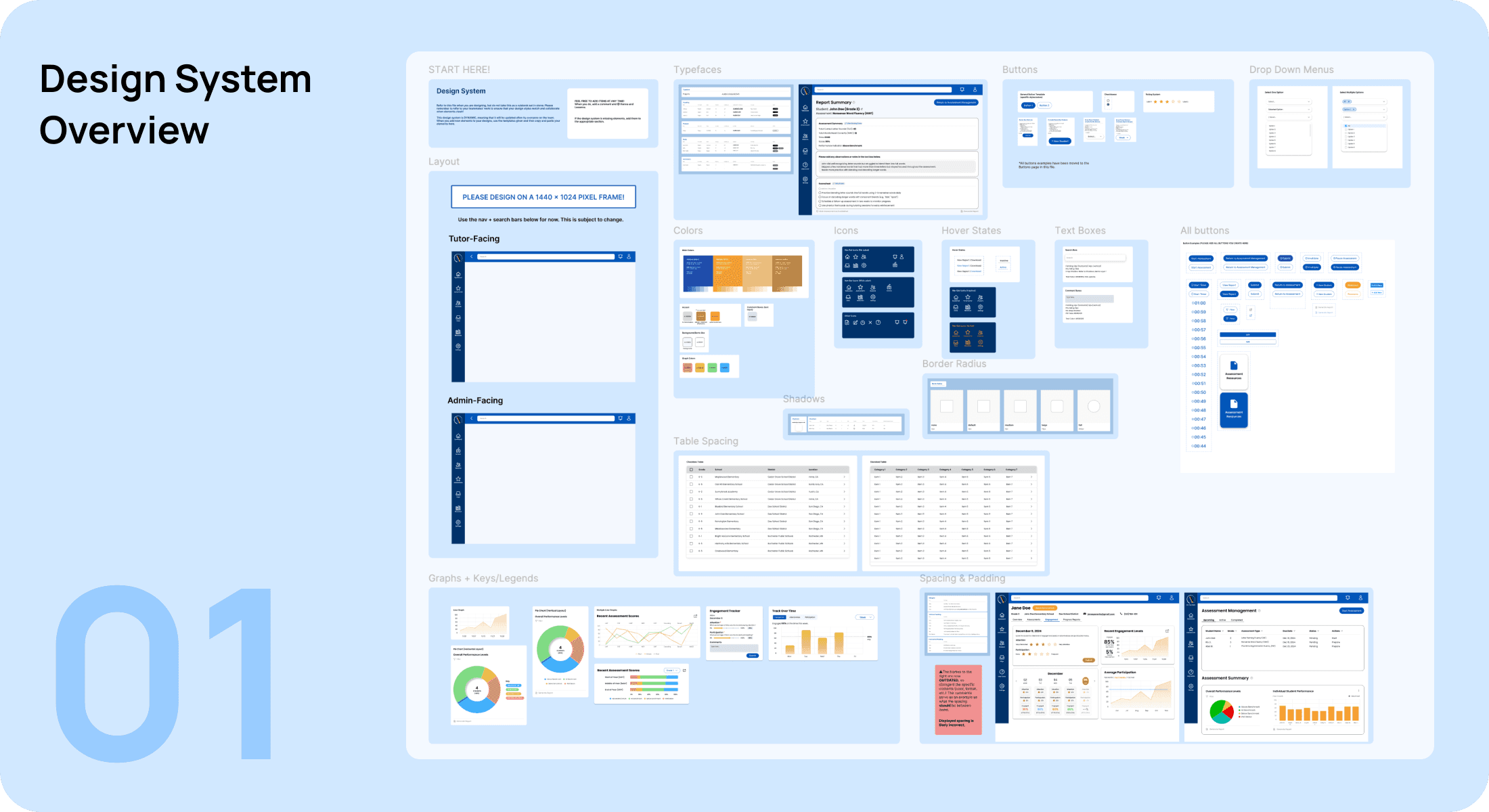
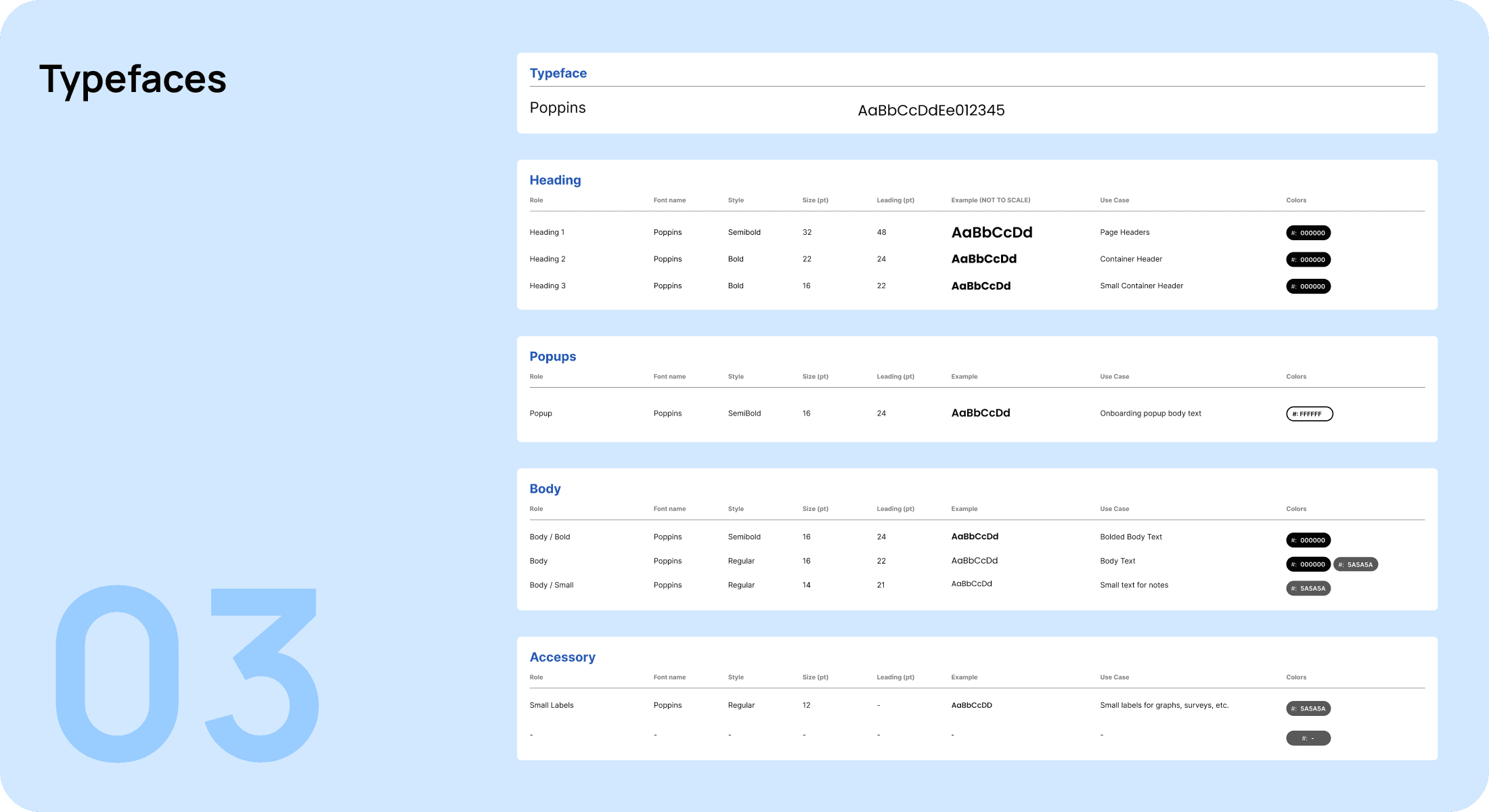
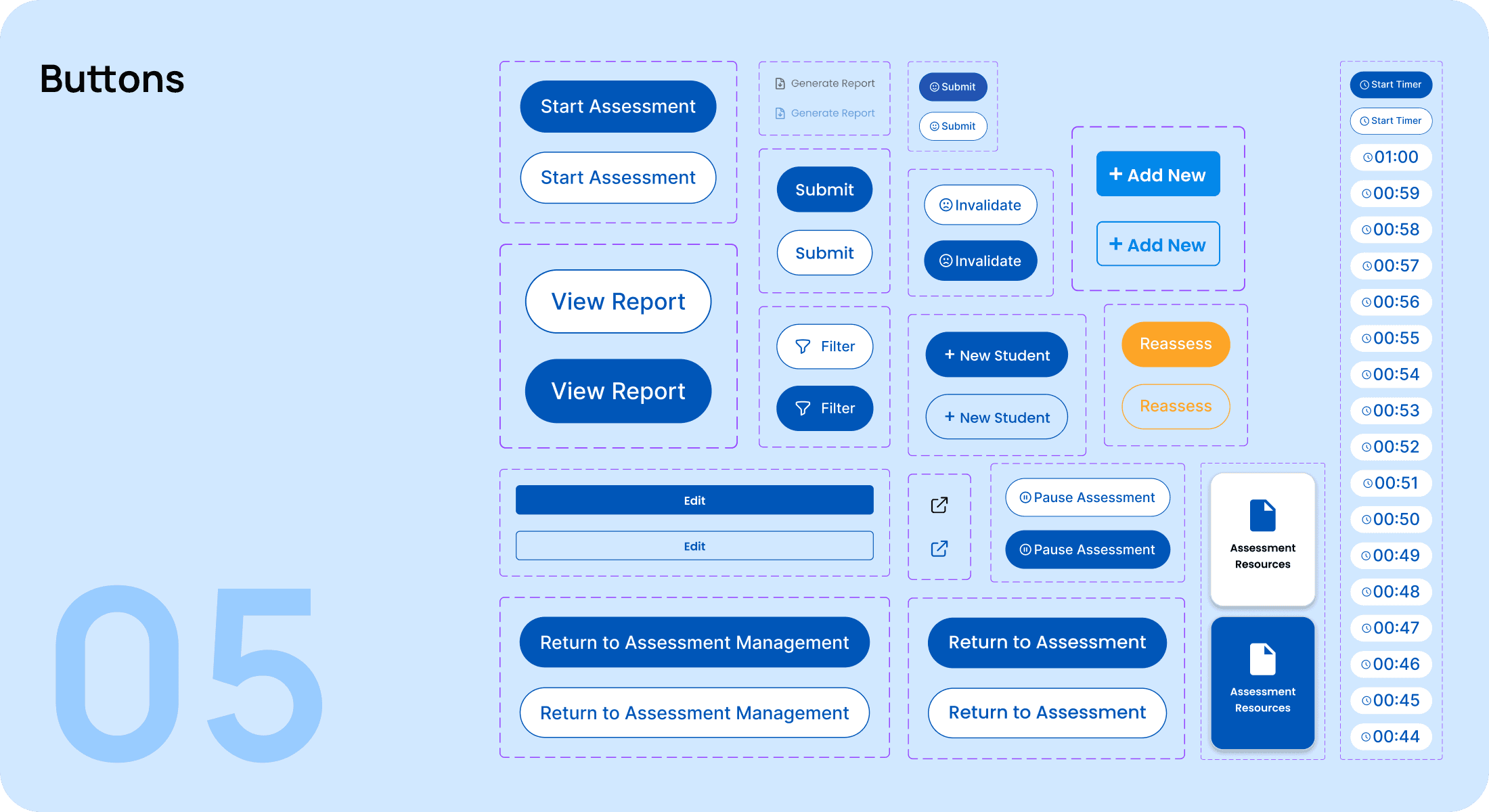
With six designers working on different modules (Tutor vs. Admin), there was a high risk of "Frankenstein UI", where inconsistent spacing, button styles, and table structures confuse the user. I took a proactive role in ensuring our 0→1 platform remained cohesive and accessible.
With six designers working on different modules (Tutor vs. Admin), there was a high risk of "Frankenstein UI", where inconsistent spacing, button styles, and table structures confuse the user. I took a proactive role in ensuring our 0→1 platform remained cohesive and accessible.
With six designers working on different modules (Tutor vs. Admin), there was a high risk of "Frankenstein UI", where inconsistent spacing, button styles, and table structures confuse the user. I took a proactive role in ensuring our 0→1 platform remained cohesive and accessible.
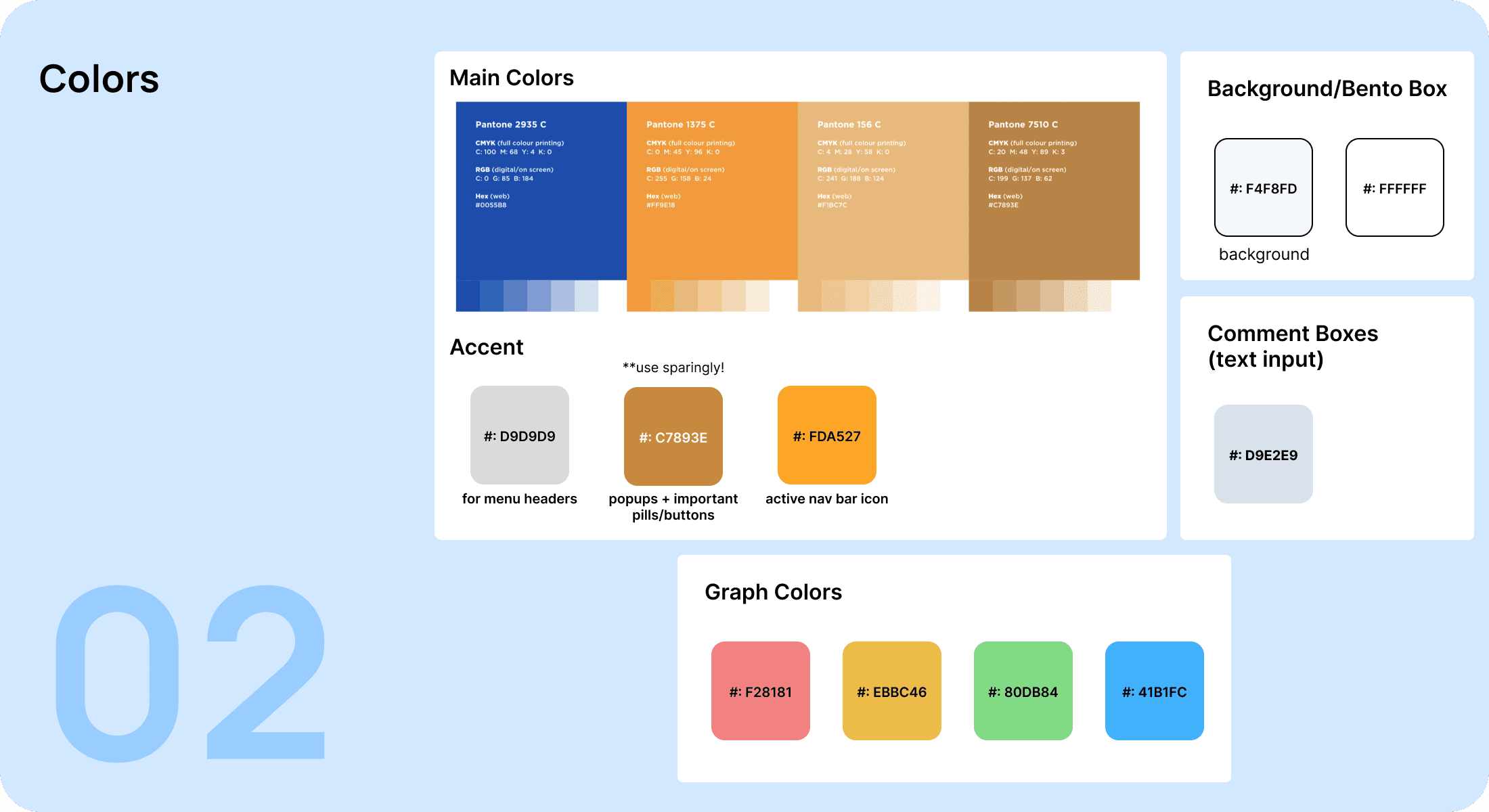
One of our most debated decisions was the color system for student benchmarks. We needed to communicate urgency without creating anxiety for the tutors.
The Pivot: Initially, we used a traditional "Traffic Light" system (Red/Yellow/Green). However, feedback indicated the red felt too aggressive.
The Solution: I helped transition the system to a soft, accessible palette. We used a muted coral for "At-Risk" and deep navy for primary actions. This maintained visual hierarchy while meeting WCAG 2.1 contrast standards, ensuring the dashboard was usable for tutors in various lighting conditions.
One of our most debated decisions was the color system for student benchmarks. We needed to communicate urgency without creating anxiety for the tutors.
The Pivot: Initially, we used a traditional "Traffic Light" system (Red/Yellow/Green). However, feedback indicated the red felt too aggressive.
The Solution: I helped transition the system to a soft, accessible palette. We used a muted coral for "At-Risk" and deep navy for primary actions. This maintained visual hierarchy while meeting WCAG 2.1 contrast standards, ensuring the dashboard was usable for tutors in various lighting conditions.
Takeaways
Takeaways
Delivering a Centralized Solution
Delivering a Centralized Solution
Delivered a 0→1 product, providing tutors and administrators with a unified platform to manage student progress, assessments, and interventions seamlessly.
Delivered a 0→1 product, providing tutors and administrators with a unified platform to manage student progress, assessments, and interventions seamlessly.
Driving Operational Efficiency
Driving Operational Efficiency
By centralizing workflows and reducing reliance on multiple tools, the platform will improve operational efficiency, cutting the time spent switching between systems by an estimated 30%.
By centralizing workflows and reducing reliance on multiple tools, the platform will improve operational efficiency, cutting the time spent switching between systems by an estimated 30%.
Scaling Nationwide Impact
Scaling Nationwide Impact
Once fully launched in 2026, the dashboard is expected to empower 3,000 tutors and impact 8,000 students across the United States, transforming literacy outcomes for thousands of young learners.
Once fully launched in 2026, the dashboard is expected to empower 3,000 tutors and impact 8,000 students across the United States, transforming literacy outcomes for thousands of young learners.
Mentor Feedback
Mentor Feedback
Mentor Feedback
From industry professionals @
HP Enterprise,
Cisco, and Bloomberg
From industry professionals @
HP Enterprise,
Cisco, and Bloomberg
From industry professionals @
HP Enterprise,
Cisco, and Bloomberg
Our product was validated through presentations and prototype reviews with industry mentors .
Our team was recognized for exceptional project execution, scoring up to 11.5% above average across key impact (client and social impact) and teamwork metrics in an industry-evaluated assessment.
Our product was validated through presentations and prototype reviews with industry mentors .
Our team was recognized for exceptional project execution, scoring up to 11.5% above average across key impact (client and social impact) and teamwork metrics in an industry-evaluated assessment.
Our product was validated through presentations and prototype reviews with industry mentors .
Our team was recognized for exceptional project execution, scoring up to 11.5% above average across key impact (client and social impact) and teamwork metrics in an industry-evaluated assessment.
"The students did a great job, and I can see the project has a significant impact on the education system, helping support students in need. Their communication was clear, and it was easy to follow throughout."
"A super impressive team. They executed an amazing project. First, they talked about the problem they were trying to solve. Second, they shared the presentation extremely well. The slides were also very supportive of what they were trying to achieve. Third, they came across as very credible and mature. Overall, very impressed with the content and material that was outputted within such a short period of time."
"This group was excellent. They were professional, put together, and came across as cohesive, organized, and confident. They gave a great presentation with good stats, screenshots, and videos. They were articulate and engaging during the Q&A and also asked good questions of the mentors."
“Collaboration!! A well-polished, thought-out solution in such a short time frame. Each had their swim lane and was able to expertly convey their part of the process in the tool’s creation. Overall, I was completely blown away! What a great group.”


Want to learn more about this project?
Want to learn more about this project?
Want to learn more about this project?
Check out the full extensive case study (from research to lo-fis and hi-fis) by clicking on the button below:
Check out the full extensive case study (from research to lo-fis and hi-fis) by clicking on the button below: